I recently got into Notion.so and I must say, it’s a blast to use! Notion for those of you who don’t know is a personal notebook / todo list / journalling thing that is really handy for people who want to take digital notes. It’s cross-platform and has markdown support however they don’t officially support Linux. While there are 3rd party clients out there that make Notion into a web app so you can use it on your computer, I wanted to do it differently and take a cleaner approach.
Epiphany! That’s the name of GNOME’s flagship web browser. It’s a simple browser but it has one killer feature that can turn websites into web apps! The beauty of this is that you can do this for any website, whether you use social platforms like Instagram or Twitter, it’s a perfect way to integrate it with the rest of your system. Also, all web apps you create are sandboxed meaning they aren’t going to snoop or interfere with your browser (a win for privacy!)
Installing Epiphany (or GNOME Web)
Epiphany is the package name but GNOMEies like to refer to it as GNOME Web. This package should be basically on every distribution repository but if you’re anti-GNOME or something, you might want to look else where. You can install it through your software center / desired package manager or depending on your distro, you can try the command line method.
# fedora
sudo dnf install epiphany

# ubuntu / linux mint / debian et. al.
sudo apt install epiphany-browser

# arch linux / manjaro
sudo pacman -S epiphany

# flatpak (uses flathub.org repos)
flatpak install flathub org.gnome.Epiphany
Adding Notion.so to our system
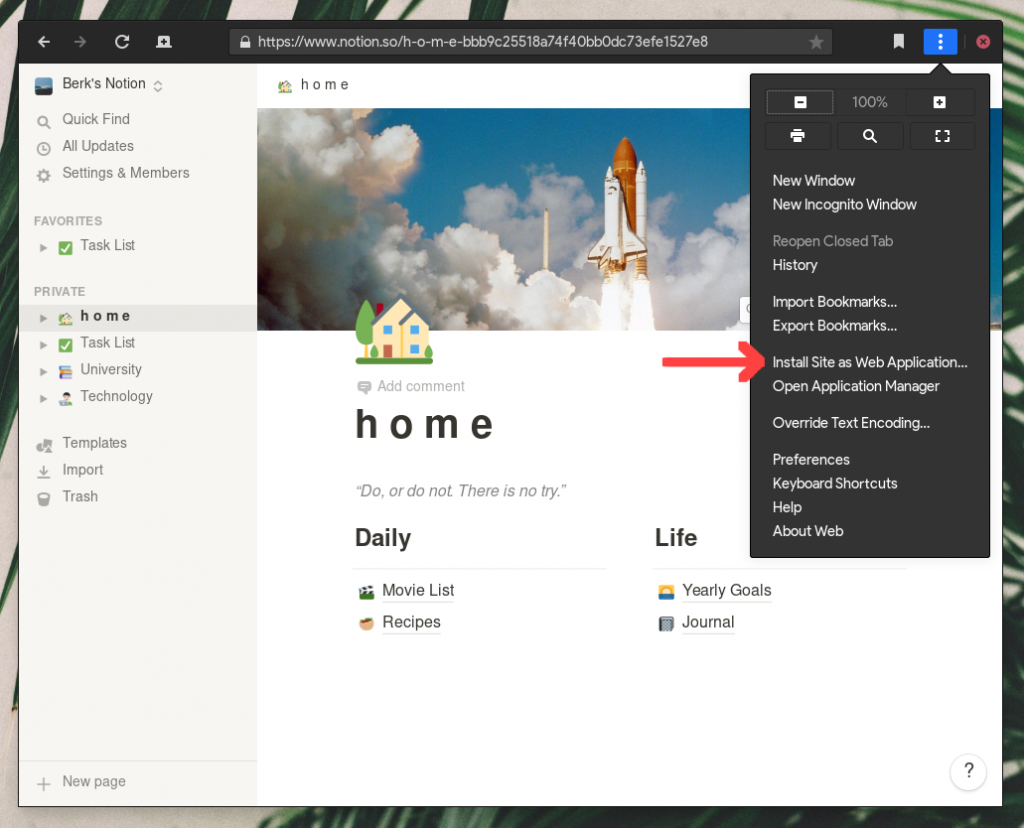
Basically, open the browser and go to notion.so and login. Once done, open the menu (top-right) and click on “Install Site as Web Application”.
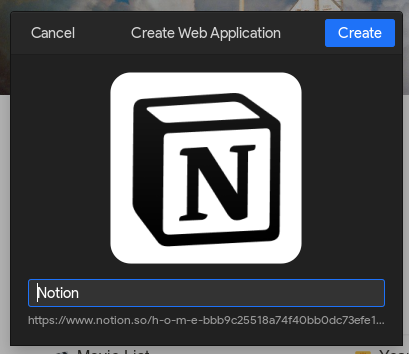
You will then get a popup like shown below. Simply click “Create” or give it a different name.
That’s it! Now you can open your menu or if you’re on GNOME, just press Start / Super and type “notion”.

Once you run it, you’ll probably be prompted to log in and you’re good to go! Now you have a standalone Notion web app to use on your Linux machine! One downside is that it isn’t going to work offline but hey, now you can alt-tab into Notion instead of having it incorporated inside your browser.
Happy note taking!

Ian
September 27, 2020 — 3:29 am
Hi!
Thanks a lot of sharing this. Very helpful!
Do you know how to change the web app’s font sizes? I can see how in the epiphany browser, but can’t seem to find it in the web app.
Cheers!
berk
September 28, 2020 — 11:45 am
Glad you found it useful.
Not sure, I think Notion doesn’t offer that, I had to increase the size, like you mentioned, in Epiphany (CTRL + Plus). Of course, the UI is also bigger :/
Navjyot
October 18, 2020 — 10:46 pm
“DOESN’T work with GOOGLE ACCOUNT login”
Hi,
I tried the above method, in my Linux Manjaro- it just took 20Mb and its awesome [for Epiphany].
I installed the Notion WebApp in my system and luckily, it launched but it started to stall due to google account API issues and it didn’t go further.
So, I just went back to the web-page in Epiphany and in Settings of Notion , I created a notion account password for my gmail.
Gratefully, it worked and now I can easily use my Notion web-app from my system.
Just sharing, perhaps it will help someone facing the issue while logging in using Google Account.
Thank You.. 🙂
Jason Boyett
September 9, 2023 — 8:56 pm
just put in your google email and they will send you a login code.
João Vanzuita
November 8, 2020 — 5:06 pm
It works perfectly! Thank you for sharing
berk
November 12, 2020 — 11:30 am
Glad you found it useful. 🙂
AlmaLinux vs Rocky Linux
April 3, 2023 — 11:50 am
Great! Thank you for this helpful information.
Dan Dascalescu
August 22, 2023 — 4:52 pm
As of August 2023, Epiphany is incredibly slow, and loading Notion often crashes the page. I wasn’t in fact able to go through the Google SSO to start using Notion.
Why Notion doesn’t offer even the barebones PWA experience, I don’t understand.
Buy PowerMTA
July 21, 2024 — 6:54 pm
Very nice tutorial blog. Thanks for hard work you doing.
Codermails
September 10, 2024 — 2:23 am
Very needed post. I was searching for this. Thanks you helping
Berk D.
November 6, 2024 — 9:30 am
Glad you found it useful. 🙂
linebet app
March 20, 2025 — 10:12 am
Great post! I really appreciate the step-by-step instructions for installing the Notion web app on Linux. It worked perfectly for me, and I’ve been needing a good way to organize my notes. Keep up the awesome work!
capcut apk
May 13, 2025 — 6:42 am
Great guide! I’ve been looking for a way to use Notion on my Linux machine, and your step-by-step instructions made it so easy. Thank you for sharing!
a1 Lottery Login
May 25, 2025 — 5:59 am
Great guide! I’ve been looking for a way to use Notion on my Linux setup, and this step-by-step explanation made it super easy. Thanks for sharing!
jalwa game
June 24, 2025 — 4:57 pm
Great guide! I’ve been looking for a way to use Notion on my Linux system, and your step-by-step instructions made it so easy. Can’t wait to start organizing my notes with it! Thank you!
90 Club
June 25, 2025 — 4:17 am
Great guide! I never thought installing the Notion web app on Linux could be this straightforward. Thanks for the clear instructions!
wealth dt6 game
July 30, 2025 — 7:17 am
Great guide! I’ve been trying to find a way to use Notion on my Linux machine, and your step-by-step instructions made it so easy. Thanks for sharing!
Golo Game
August 29, 2025 — 10:46 am
Great post! I just followed your steps to install the Notion web app on my Linux machine, and it worked perfectly. Thanks for making it so easy to set up!
Amar Club
August 31, 2025 — 4:33 am
Thanks for this detailed guide! I’ve been trying to get Notion running on my Linux machine, and your step-by-step instructions made it super easy. Love how you included screenshots for clarity. Keep up the great work!
Mitolyn
September 2, 2025 — 10:49 pm
Great guide! I followed your steps to install the Notion web app on my Linux machine, and it worked perfectly. Thanks for making it so easy to get started!
Basant Club app
September 14, 2025 — 6:40 am
Great guide! I always wanted to use Notion on Linux, and your step-by-step instructions made it super easy. Thank you for sharing!
TT789
October 13, 2025 — 1:31 pm
Great guide! I followed your steps to install the Notion web app on my Linux system, and it worked perfectly. Thanks for making it so straightforward!
Tigro Club App
October 23, 2025 — 11:15 am
Thanks for the detailed guide! I’ve been looking for a way to install Notion on my Linux machine, and your steps were easy to follow. It worked perfectly!
101 game login
October 27, 2025 — 4:22 am
Great post! The step-by-step instructions made it super easy to set up Notion on my Linux system. I appreciate the tips you included for troubleshooting common issues. Thanks for sharing!